Security guard contract management softwareBRING THE AGREEMENT AND THE SIGNATURE INTO ONE WORKFLOW.
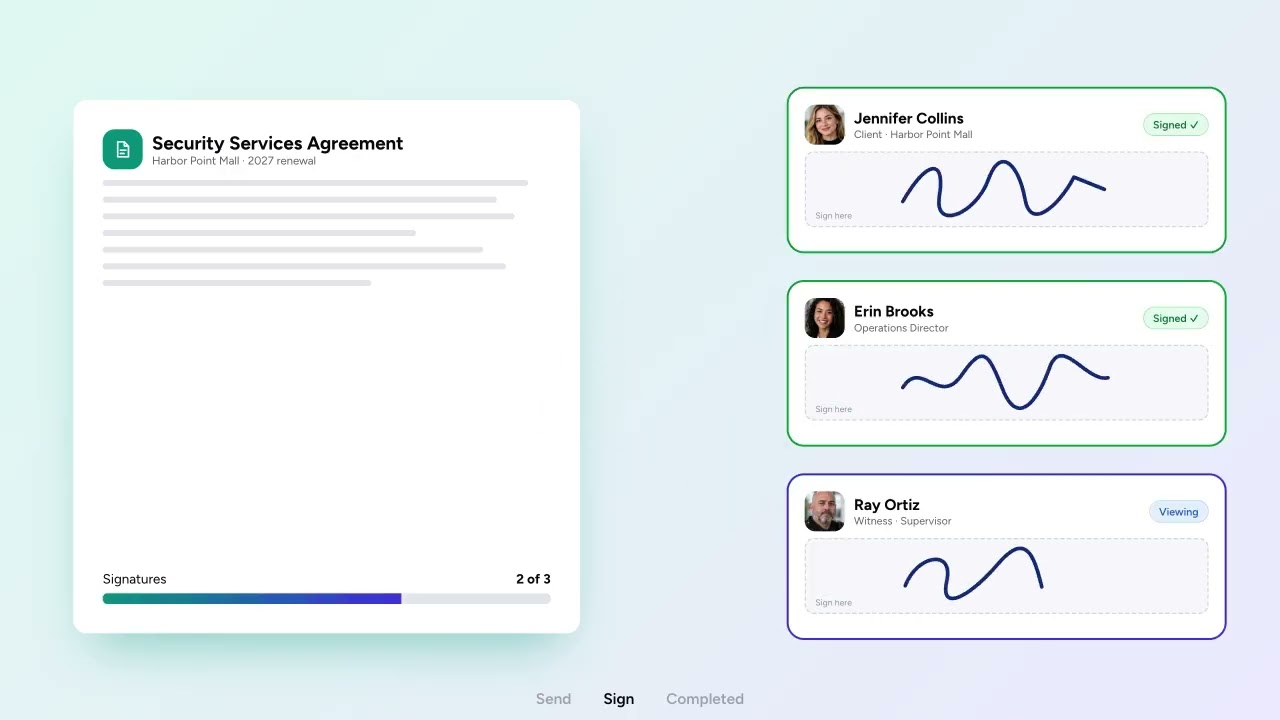
Guardix prepares service contracts from an approved proposal, a saved contract template or an uploaded PDF, and collects signatures online through emailed links. Signers can sign all at once or one after another, and the finished PDF carries a signature certificate. Expiration dates and renewal notice periods are tracked, with a reminder before each contract runs out.
Contracts sit beside Proposals in the web app, share the same template library, and draw on a Clauses library of reusable legal wording.
Templates and a clause library
Build contract templates for unarmed, armed, mobile patrol, event, executive protection, master services or amendment agreements, and insert clauses from the Clauses library. Or upload an existing PDF and place signature, date and text fields on it.
Details filled from your records
Variables pull the client, post site, service, officer count, schedule and rates into the document. Starting from an approved proposal carries over its client details, pricing, attachments and scope, and you check every page before it goes out.
Several signers, in your order
Add each party and choose Everyone at once or One at a time. Each signer gets an emailed link, the status moves from Awaiting Signature to Signed, and voiding a link returns the contract to Draft for corrections.
A record for the account
Each contract keeps its client, post site, value, dates, renewal terms, internal owner, attachments and activity timeline. The executed PDF ends with a certificate page recording who signed, when, and a fingerprint of the document they saw.
Renewal reminders
Set an expiration date and a notice period. When an active contract enters that window, Guardix marks it Expiring Soon and notifies the office, so there is time to agree a renewal.
Status through the whole term
Activate, renew, cancel or archive a contract, each with an optional note in its activity log. Removed contracts move to a Deleted list with their signatures and history kept, and can be restored.
01 / 04
Templates and a clause library
Build contract templates for unarmed, armed, mobile patrol, event, executive protection, master services or amendment agreements, and insert clauses from the Clauses library. Or upload an existing PDF and place signature, date and text fields on it.
02 / 04
Details filled from your records
Variables pull the client, post site, service, officer count, schedule and rates into the document. Starting from an approved proposal carries over its client details, pricing, attachments and scope, and you check every page before it goes out.
03 / 04
Several signers, in your order
Add each party and choose Everyone at once or One at a time. Each signer gets an emailed link, the status moves from Awaiting Signature to Signed, and voiding a link returns the contract to Draft for corrections.
04 / 04
A record for the account
Each contract keeps its client, post site, value, dates, renewal terms, internal owner, attachments and activity timeline. The executed PDF ends with a certificate page recording who signed, when, and a fingerprint of the document they saw.
Service agreementPier 9
Scope of service
Rates and billing
Term and renewal
Insurance
Client {{client}}Pier 9 Holdings · Rate {{rate}}$27.00 / h
Signatures
MRMarcus ReedGuardix customerPendingSigned
LBLena BrooksPier 9PendingSigned
DPDev PatelFinancePendingSigned
Pier 9 HoldingsAccount
Service agreementSigned Oct 14
Rates$27.00 / h
RenewalOct 2027
Contracts & E-Signatures
Who uses it, and where.
Contracts are prepared and tracked in the web app; people outside your company sign from an emailed link and need no Guardix login.
Admins
Create, send, void, countersign and manage contracts, templates and clauses on the web. In the default roles these permissions belong to Admin only, and a company can give them to a custom role.
Client signers
Open the contract from the emailed link, fill in any fields assigned to them, sign, and receive the completed PDF with its certificate by email.
Finance staff
Tag expenses to a contract and read Expenses by Contract in expense reports to see what each agreement costs to deliver.
How it works
How it works
1
Start the contract.
Begin from an approved proposal, a contract template, or an uploaded PDF or DOC file.
2
Fill fields and add parties.
Fill in your fields, add each signer's name and email, and work through the Ready to Send Checklist.
3
Send for signature.
Choose everyone at once or one at a time, follow each signer, and countersign if your company is a party.
4
Track the term.
Activate the signed contract, keep its expiration and notice period current, and act on the Expiring Soon reminder.
FAQ
Frequently asked questions
Can a contract have more than one signer?
Yes. Add every party on Send for signature and pick the signing order. With Everyone at once, each signer gets a link now and can sign in any order. With One at a time, each person is emailed when the one before them signs. The contract completes when the last person signs.
Do clients need a Guardix account to sign?
No. Each signer opens the contract from a secure link in their email, fills in any fields assigned to them and signs. When the contract is complete, the signers are emailed the executed PDF, which ends with a certificate page showing who signed and when.
Can we reuse our approved contract language?
Yes. Keep standard wording in the Clauses library and insert it into contract templates, which also hold sections and variables. Templates can be written in Guardix or built from your own PDF with signature, date and text fields placed on it.
Who can create and send contracts?
In the default roles, only Admin can create, send, void and delete contracts and manage templates and clauses. Companies can add these permissions to a custom role, for example for account managers. Signers outside the company only see the contract they were sent.
What is security guard contract management software?
Security guard contract management software prepares service contracts, collects signatures and tracks each contract through its term. Guardix builds a contract from an approved proposal, a saved template or an uploaded PDF, and sends signers emailed links. They can sign all at once or one after another, and the finished PDF carries a signature certificate. Guardix tracks expiration dates and reminds the office before a contract runs out.
Next step
Move from approved offer to signed agreement.
Give your contracts a connected place in the Guardix business workflow.